Microsoft ES4649 Instrukcja Użytkownika Strona 118
- Strona / 674
- Spis treści
- ROZWIĄZYWANIE PROBLEMÓW
- BOOKMARKI

- Powered by Accton 1
- Gigabit Ethernet Switch 3
- F3.1.1.21 E042005-R01 4
- 149100022900A 4
- Contents 22
- Chapter 1: Introduction 31
- Introduction 32
- System Defaults 36
- Connecting to the Switch 41
- Required Connections 42
- Stack Operations 43
- Selecting the Backup Unit 44
- Renumbering the Stack 45
- Stack Limitations 45
- Basic Configuration 46
- Setting Passwords 47
- Setting an IP Address 47
- Initial Configuration 48
- Dynamic Configuration 48
- Trap Receivers 50
- Saving Configuration Settings 51
- Managing System Files 52
- Using the Web Interface 53
- Home Page 54
- Configuration Options 55
- Panel Display 55
- Main Menu 56
- Manual Configuration 70
- Using DHCP/BOOTP 71
- Managing Firmware 72
- Console Port Settings 77
- Telnet Settings 79
- Configuring Event Logging 81
- Remote Log Configuration 82
- Displaying Log Messages 84
- Resetting the System 87
- Setting the System Clock 87
- Setting the Time Zone 88
- Figure 3-24 Clock Time Zone 89
- Enabling the SNMP Agent 91
- Setting a Local Engine ID 95
- Specifying a Remote Engine ID 95
- Configuring SNMPv3 Users 96
- Configuring the Switch 100
- Configuring SNMPv3 Groups 100
- Setting SNMPv3 Views 104
- User Authentication 105
- Configuring HTTPS 110
- Configuring the Secure Shell 112
- Generating the Host Key Pair 113
- Configuring the SSH Server 115
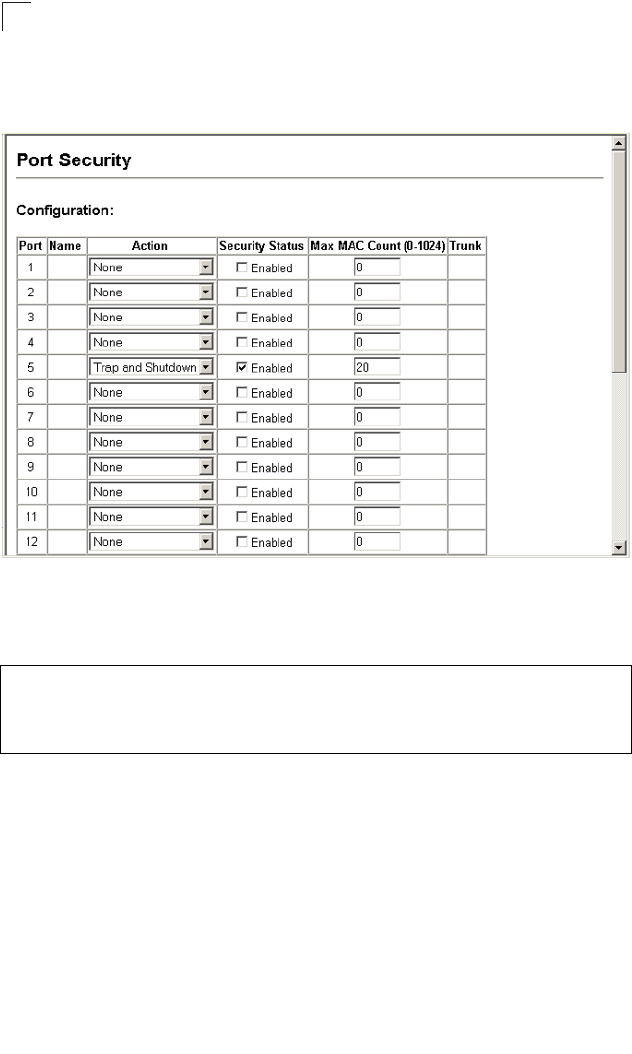
- Configuring Port Security 117
- Displaying 802.1X Statistics 124
- Access Control Lists 128
- Setting the ACL Name and Type 129
- Configuring a Standard IP ACL 129
- Configuring a MAC ACL 133
- Configuring ACL Masks 135
- Configuring an IP ACL Mask 136
- Configuring a MAC ACL Mask 138
- Port Configuration 140
- Creating Trunk Groups 145
- Configuring LACP Parameters 149
- Displaying LACP Port Counters 152
- Configuring Port Mirroring 158
- Configuring Rate Limits 159
- Showing Port Statistics 160
- Address Table Settings 164
- Displaying the Address Table 165
- Changing the Aging Time 167
- Displaying Global Settings 168
- Configuring Global Settings 171
- Displaying Interface Settings 175
- Settings,” page 3-123 181
- VLAN Configuration 187
- VA: VLAN Aware 188
- VU: VLAN Unaware 188
- Displaying Current VLANs 191
- Creating VLANs 192
- Configuring Private VLANs 198
- Configuring Protocol Groups 200
- Mapping Protocols to VLANs 201
- Layer 2 Queue Settings 202
- Figure 3-87 Traffic Classes 205
- Selecting the Queue Mode 206
- Layer 3/4 Priority Settings 208
- Mapping IP Precedence 209
- Mapping DSCP Priority 210
- Mapping IP Port Priority 212
- Quality of Service 213
- Configuring a Class Map 214
- Creating QoS Policies 217
- Multicast 221
- Multicast Filtering 223
- L3 - network core 229
- Displaying the DNS Cache 237
- Console(config-if)# 239
- Configuring the DHCP Server 240
- Console# 241
- Configuring Address Pools 242
- Console(config-dhcp)# 243
- Displaying Address Bindings 246
- Master Router 247
- Backup Router 247
- Configuring VRRP Groups 248
- Configuring Router Redundancy 249
- IP Routing 256
- IP Switching 257
- Routing Path Management 258
- Routing Protocols 258
- Address Resolution Protocol 262
- Basic ARP Configuration 263
- Displaying Local ARP Entries 266
- Displaying ARP Statistics 267
- IP Statistics 268
- ICMP Statistics 270
- UDP Statistics 272
- TCP Statistics 273
- Configuring Static Routes 274
- Displaying the Routing Table 275
- Autonomous System A 286
- Autonomous System B 286
- Configuring OSPF Areas 290
- Configuring OSPF Interfaces 295
- Configuring Virtual Links 299
- Configuring NSSA Settings 306
- Multicast Routing 312
- Configuring DVMRP 316
- Configuring PIM-DM 323
- Accessing the CLI 329
- Console Connection 329
- Telnet Connection 329
- Command Line Interface 330
- Entering Commands 331
- Showing Commands 332
- Partial Keyword Lookup 333
- Using Command History 333
- Understanding Command Modes 334
- Exec Commands 334
- Configuration Commands 335
- Command Line Processing 337
- Command Groups 338
- Line Commands 339
- General Commands 348
- System Management Commands 353
- User Access Commands 355
- IP Filter Commands 357
- Web Server Commands 359
- Telnet Server Commands 362
- Event Logging Commands 371
- SMTP Alert Commands 377
- Time Commands 381
- System Status Commands 385
- Frame Size Commands 391
- Flash/File Commands 392
- Authentication Commands 398
- RADIUS Client 400
- TACACS+ Client 403
- Port Security Commands 406
- 802.1X Port Authentication 408
- Access Control List Commands 415
- IP ACLs 417
- MAC ACLs 427
- ACL Information 434
- SNMP Commands 435
- DHCP Commands 449
- DHCP Relay 451
- DHCP Server 452
- DNS Commands 464
- Interface Commands 471
- Mirror Port Commands 482
- Rate Limit Commands 484
- Link Aggregation Commands 485
- Address Table Commands 494
- Spanning Tree Commands 498
- 499
- VLAN Commands 516
- Configuring VLAN Interfaces 518
- Displaying VLAN Information 523
- Priority Commands 534
- Quality of Service Commands 546
- Multicast Filtering Commands 554
- IGMP Snooping Commands 555
- IGMP Commands (Layer 3) 562
- IP Interface Commands 569
- IP Routing Commands 577
- ip-address 593
- Multicast Routing Commands 623
- Router Redundancy Commands 642
- Software Features 653
- Management Features 654
- Standards 654
- Management Information Bases 655
- Software Specifications 656
- Appendix B: Troubleshooting 657
- Using System Logs 658
- Glossary 659
- Glossary-8 666
- E042005-R01 674
Powiązane produkty i podręczniki dla Oprogramowanie Microsoft ES4649
 (142 strony)
© 2020, manymanuals.pl. Wszelkie prawa zastrzeżone. | 0.063 s |
 Manymanuals.com
 Manymanuals.de
 Manymanuals.fr
 Manymanuals.it
 Manymanuals.pl
 Manymanuals.cz
 Manymanuals.es
 Manymanuals-pt.com
Komentarze do niniejszej Instrukcji